1. 配置两个数据库环境
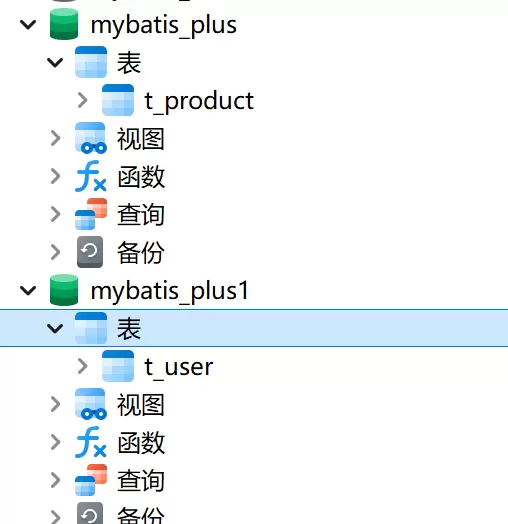
确保数据库 mybatis_plus 中包含 product 表,同时数据库 mybatis_plus1 中包含 user 表。
2. 添加项目依赖
在项目中引入所需的 Maven 或 Gradle 依赖,以支持多数据源及 MyBatis-Plus 功能。
<dependency>
            <groupId>com.baomidou</groupId>
            <artifactId>dynamic-datasource-spring-boot-starter</artifactId>
            <version>3.5.0</version>
        </dependency>
3. 数据源标识设置
在对应的业务实现类中,通过 @DS 注解指定所使用的数据源。例如,在 UserServiceImpl 中指向 user 相关的数据源,在 ProductServiceImpl 中指向 product 所属的数据源。


4. 多数据源配置
修改 application.yaml 文件,完成多数据源的配置。其中 primary: master 表示当未明确指定数据源时,默认使用名为 master 的数据源。
spring:
  datasource:
    dynamic:
      # 设置默认的数据源或者数据源组 ,默认值即为master
      primary: master
      # 严格匹配数据源 ,默认false.true未匹配到指定数据源时抛异常 ,false使用默认数据源
      strict: false
      datasource:
        #master:product表
        master:
          type: com.zaxxer.hikari.HikariDataSource
          driver-class-name: com.mysql.cj.jdbc.Driver
          url: jdbc:mysql://localhost:3306/mybatis_plus?characterEncoding=utf-8&useSSL=false
          username: root
          password: root
        #slave_1:user表
        slave_1:
          type: com.zaxxer.hikari.HikariDataSource
          driver-class-name: com.mysql.cj.jdbc.Driver
          url: jdbc:mysql://localhost:3306/mybatis_plus1?characterEncoding=utf-8&useSSL=false
          username: root
          password: root
mybatis-plus:
  configuration:
    log-impl: org.apache.ibatis.logging.stdout.StdOutImpl
  global-config:
    db-config:
      table-prefix: t_
  type-enums-package: com.qcby.enums
5. 测试验证配置
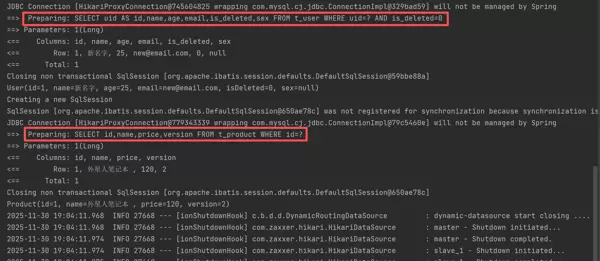
编写测试代码,调用相关服务方法,检查是否能正常访问两个数据库中的数据。
若 product 和 user 数据均可成功查询,则说明多数据源配置已生效。
package com.qcby;

import com.qcby.service.ProductService;
import com.qcby.service.UserService;
import org.junit.jupiter.api.Test;
import org.springframework.beans.factory.annotation.Autowired;
import org.springframework.boot.test.context.SpringBootTest;

@SpringBootTest
public class MybatisTestSource {

    @Autowired
    private UserService userService;

    @Autowired
    private ProductService productService;

    @Test
    public void testDynamicDataSource(){
        System.out.println(userService.getById(1L));
        System.out.println(productService.getById(1L));
    }
}




 扫码加好友,拉您进群
 全部版块
全部版块 我的主页
我的主页


 收藏
收藏





