全部版块 我的主页
论坛 计量经济学与统计论坛 五区 计量经济学与统计软件 LATEX论坛
2018-5-1 14:43:04
二维码

扫码加我 拉你入群

请注明:姓名-公司-职位

以便审核进群资格,未注明则拒绝

2018-5-1 14:43:28
二维码

扫码加我 拉你入群

请注明:姓名-公司-职位

以便审核进群资格,未注明则拒绝

2018-5-1 20:22:31
常用命令
查看目录: ls
ls (List) 用不同颜色、经过排列的文本列出目录下的文件。
创建目录: mkdir (目录名)
mkdir (MaKeDIRectory) 命令可以创建目录。
切换目录: cd (directory/location)
cd (ChangeDirectory) 命令可以从您的当前目录切换到您指定的任意目录。
复制文件/目录: cp (源文件或目录名) (目标目录或文件名)
cp (CoPy) 命令会拷贝您指定的任意文件。cp -r 命令则可以拷贝您指定的任意目录(注:包括该目录里的文件和子目录)。
删除文件/目录: rm (文件或目录名)
rm (ReMove) 可以删除您指定的任意文件。rm -rf 命令则可以删除您指定的任意目录(注:包括该目录里的文件和子目录)。
重命名文件/目录: mv (文件或目录名)
mv (MoVe) 命令可以重命名/移动您指定的任意文件或目录。
查找文件/目录: locate (文件或目录名)
二维码

扫码加我 拉你入群

请注明:姓名-公司-职位

以便审核进群资格,未注明则拒绝

2018-5-1 20:22:58
1. 切换到 root 用户 ,输入 “sudo -i ”或“sudo su -”, 退出 “exit”

2. pwd 显示当前目录, pwd = print working directory

3. ls 列出目录下当前文件

4. cp 复制文件/目录 cp (源文件或目录) (目标文件或目录)
二维码

扫码加我 拉你入群

请注明:姓名-公司-职位

以便审核进群资格,未注明则拒绝

2018-5-1 20:23:46
5. rm 删除文件/目录 可以删除文件

    rm -rf  删除目录包含子目录和文件
    rmdir  删除空文件夹
6. mv 移动或重命名 文件

7. cd 进入目录

    cd / 进入根目录
    cd 或 cd ~ 进入用户的 home 目录
    cd - 进入上次访问的目录 (相当于 back)
  
   cd ..  进入上级目录
8. man 显示某个命令的 manual

9. df 显示文件系统空间信息

   df -h  用 M 和 G 做单位显示文件系统空间信息 -h 意思是 human-readable
10. du 显示目录的空间使用信息

    du -sh /media/floppy
    -s 意思 summary  -h 意思 human-readable

11. ifconfig 显示系统的网络

12. locate 命令会在您的计算机里搜索您指定的任意文件。它使用您系统中的文件索引以便进行快速查找:运行命令 updatedb 可以更新该索引。每天您一开机,该命令便会(在合适的时机)自动运行。运行该命令需要具备管理员权限 (参见 第1.3.3节 ― root 用户和 sudo 命令)。

您还可以使用通配符来匹配一个或多个文件,如 "*" (匹配所有文件) 或 "?" (匹配一个字符)。 欲知关于 Linux 命令行的详尽介绍,请参阅 Ubuntu wiki 上的命令行介绍
二维码

扫码加我 拉你入群

请注明:姓名-公司-职位

以便审核进群资格,未注明则拒绝

2018-5-1 20:43:02
在 Ubuntu 里使用命令行的常见方法是启动一个终端 (参见前面的 第1.3.4.1节 ― 启动终端),但有些时候还是需要切换到真正的控制台下。
使用 Ctrl+Alt+F1 快捷键可以切换到第一个控制台。
要切回桌面模式,可以使用 Ctrl+Alt+F7 快捷键。
一共可以使用 6 个控制台,分别用快捷键 Ctrl+Alt+F1 到 Ctrl+Alt+F6 进行切换。
二维码

扫码加我 拉你入群

请注明:姓名-公司-职位

以便审核进群资格,未注明则拒绝

2018-5-1 20:43:24
禁止终端模式里的哔哔声
要开启一个 终端 会话,请选择:应用程序 → 附件 → 终端
编辑 → 当前配置文件...。选择 常规 标签页。勾选掉 终端响铃 复选框!
二维码

扫码加我 拉你入群

请注明:姓名-公司-职位

以便审核进群资格,未注明则拒绝

2018-5-1 20:43:48
文本编辑
Linux 中的所有配置和设定都保存在文本文件里。尽管您可以通过图形界面来编辑大部分配置,但有时您还是得手工编辑它们。Gedit 是 Ubuntu 的默认文本编辑器,您可以通过点击桌面菜单系统中的应用程序 → 附件 → 文本编辑器来启动它。 本指南中,有时为了修改配置文件,会从命令行里使用 gksudo 来运行 Gedit,这样就能以管理权限来运行 Gedit。
如果需要在命令行中使用文本编辑器,那么您可以使用 nano 这个用法简单的文本编辑器。如果要在命令行中运行 nano,请务必使用如下命令:nano -w,它可确保编辑器不会插入断行符。
欲知 nano 使用的更多信息,请参考 Wiki 上的指南。 Ubuntu 提供了大量其它基于终端的编辑器,包括流行的 VIM 和 Emacs (它们各自的赞成者和反对者在 Linux 社区里引发了许多不乏善意的争论)。和 nano 相比,通常上述编辑器的用法更为复杂,当然功能也更强大。
二维码

扫码加我 拉你入群

请注明:姓名-公司-职位

以便审核进群资格,未注明则拒绝

2018-5-1 20:44:09
 用户和组
要在您的系统中添加用户或组,可以使用 系统 → 系统管理 → 用户和组 中的 用户和组 程序。
要添加一个新用户,点击 添加用户,然后填写各项数据,点击 确定 加以确认。要编辑每个用户的属性,点击位于主 用户 /guilabel> 要添加一个新组,选择 组 标签页并点击 添加组。为新组选择一个名字,如有必要,还可以改变 组 ID 的默认值。如果您试图分配一个正在使用的 组 ID,系统会向您发出警告。 通过从左边菜单选择用户并点击添加按钮,您可以将该用户添加到新建组中。删除用户与添加一样简单:从右边菜单中选择用户并点击移除。做好上述准备之后,点击确定,便可创建一个包含有用户的新组。 要编辑组的属性,在组主窗口中,选择一个组名并点击属性按钮。 要从系统中删除一个用户或组,请先选中您要删除的用户或组,然后点击 删除。
二维码

扫码加我 拉你入群

请注明:姓名-公司-职位

以便审核进群资格,未注明则拒绝

2018-5-1 20:44:26
添加、删除和更新应用程序
介绍
为了在 Ubuntu 中添加或删除应用程序,您需要使用 软件包管理器。通过将软件处理成为 Ubuntu 优化的预配置软件包,软件包管理器工具可以容易地安装和删除这些应用程序。在本章中将介绍以下软件包管理器。
添加/删除 应用程序 - 这是最简单的管理程序的方式。
Synaptic - 这个图形化程序提供更高级的管理程序的手段。
APT - 这是一个用来管理程序的强大的命令行程序。
您也许还希望增加通过您软件包管理器来安装的程序的数量。在缺省状态下并不是所有的 Ubuntu 程序都可用。为了使它们可用您也许不得不添加额外的软件库:这在本章也有介绍。 最后,本章将说明如何更新您的系统。 您一次只能运行一个软件包管理应用程序。例如,如果您运行 添加/删除应用程序 并试着启动 更新 Ubuntu 的话,它将会因出错而失败。在您重新启动新的软件包管理应用程序之前请关闭正在运行的软件包管理应用程序。
二维码

扫码加我 拉你入群

请注明:姓名-公司-职位

以便审核进群资格,未注明则拒绝

2018-5-2 00:15:33
HP1020
二维码

扫码加我 拉你入群

请注明:姓名-公司-职位

以便审核进群资格,未注明则拒绝

2018-5-28 14:51:31
为了在 Ubuntu 中添加或删除应用程序,您需要使用 软件包管理器。通过将软件处理成为 Ubuntu 优化的预配置软件包,软件包管理器工具可以容易地安装和删除这些应用程序。在本章中将介绍以下软件包管理器。
二维码

扫码加我 拉你入群

请注明:姓名-公司-职位

以便审核进群资格,未注明则拒绝

2018-5-28 14:52:52
Ubuntu 永远免费,即便是“企业版本”也毋需额外费用, 我们要把最好的工作成果免费提供给所有人,一视同仁。
二维码

扫码加我 拉你入群

请注明:姓名-公司-职位

以便审核进群资格,未注明则拒绝

2018-5-28 14:53:23
Ubuntu 包含了自由软件社区所能提供的极其出色的翻译和易用性架构,才得以让尽可能多的人用上 Ubuntu。
二维码

扫码加我 拉你入群

请注明:姓名-公司-职位

以便审核进群资格,未注明则拒绝

2018-5-28 14:53:55
Ubuntu 项目完全遵从开源软件开发的原则;并且鼓励人们使用、完善并传播开源软件。也就是说 Ubuntu 目前是并将永远是免费的。 然而,这并不仅仅意味着零成本,自由软件的理念是人们应该以所有“对社会有用”的方式自由地使用软件。“自由软件”并不只意味着您不需要为其支付费用,它也意味着您可以以自己想要的方式使用软件:任何人可以任意方式下载、修改、修正和使用组成自由软件的代码。因此,除去自由软件常以免费方式提供这一事实外,这种自由也有着技术上的优势:进行程序开发时,就可以使用其他人的成果或以此为基础进行开发。对于非自由软件而言,这点就无法实现,进行程序开发时,人们总得白手起家。基于上述原因,自由软件的开发是迅捷、高效和激动人心的。
二维码

扫码加我 拉你入群

请注明:姓名-公司-职位

以便审核进群资格,未注明则拒绝

2018-5-28 14:54:13
目前已有大量各种各样基于 GNU/Linux 的操作系统,例如:Debian、SuSE、 Gentoo、RedHat 和 Mandriva。在这业已竞争纷繁的世界里,Ubuntu 是又一个参与者。那么 Ubuntu 何以有所不同? Debian 是一个广受称道、技术先进且有着良好支持的发行版,Ubuntu 正是基于 Debian 之上,旨在创建一个可以为桌面和服务器提供一个最新且一贯的 Linux 系统。Ubuntu 囊括了大量精挑细选自 Debian 发行版的软件包,同时保留了 Debian 强大的软件包管理系统,以便简易的安装或彻底的删除程序。与大多数发行版附带数量巨大的可用可不用的软件不同,Ubuntu 的软件包清单只包含那些高质量的重要应用程序。 在注重质量的同时,Ubuntu 提供了一个健壮、功能丰富的计算环境,既适合家用又适用于商业环境。本项目花费了大量必要的时间,努力精益求精,每6个月就会发布一个版本,以提供最新最强大的软件。Ubuntu 支持各种形形色色的架构,包括 i386 (386/486/Pentium(II/III/IV) 和 Athlon/Duron/Sempron 处理器)、AMD64(Athlon64, Opteron, 最新的64位 Intel 处理器) 以及 PowerPC (iBook/Powerbook, G4 and G5) 等。
二维码

扫码加我 拉你入群

请注明:姓名-公司-职位

以便审核进群资格,未注明则拒绝

2018-5-28 14:58:39
Ubuntu 的所有版本至少会提供 18 个月的安全和其它升级支持。Ubuntu 12.04 LTS 有点特别,它已是个准企业级版本,其桌面版本会提供3年支持,而服务器版本则将提供长达5年的支持。Ubuntu 12.04 LTS的开发周期比往常稍长,并专注于诸多领域,罗列如下:
质量保证
本地化
认证 所以和以往版本相比,您可放心长期使用 Ubuntu 12.04 LTS,由此该版本也被冠以“LTS”或“长期支持”
二维码

扫码加我 拉你入群

请注明:姓名-公司-职位

以便审核进群资格,未注明则拒绝

2018-5-29 13:22:38
The idea of profiling_num is to provide to the data scientist with a full set of metrics, so they can select the most relevant. This can easily be done using the select function from the dplyr package.

In addition, we have to set in profiling_num the parameter print_results = FALSE. This way we avoid the printing in the console.
二维码

扫码加我 拉你入群

请注明:姓名-公司-职位

以便审核进群资格,未注明则拒绝

2018-6-4 14:25:43
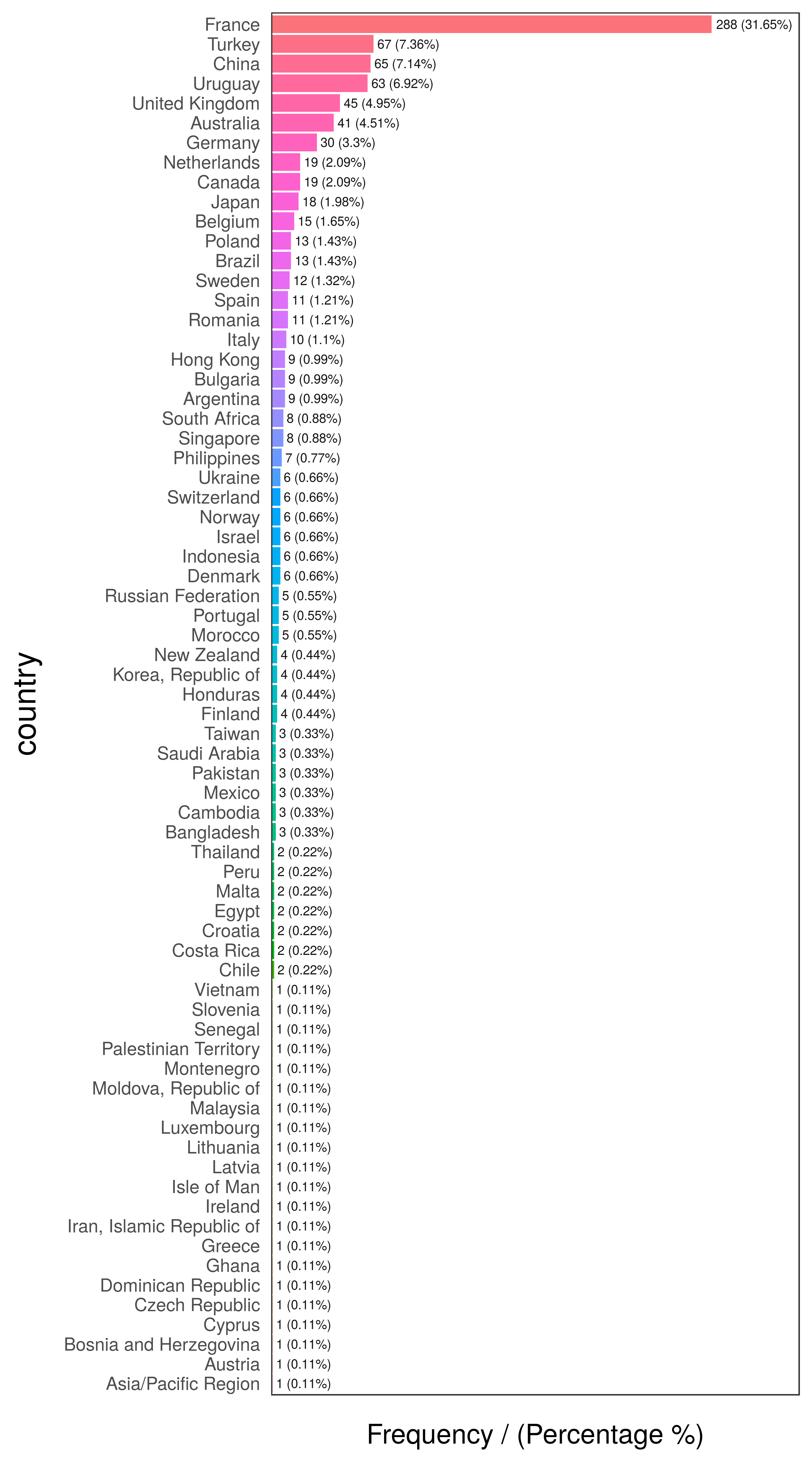
The following example contains a survey of 910 cases, with 3 columns: person, country and has_flu, which indicates having such illness in the last month.
二维码

扫码加我 拉你入群

请注明:姓名-公司-职位

以便审核进群资格,未注明则拒绝

2018-6-4 14:26:06
High Cardinality in Descriptive Statistics
The following example contains a survey of 910 cases, with 3 columns: person, country and has_flu, which indicates having such illness in the last month.

library(funModeling)
data_country data comes inside funModeling package (please update to release 1.6).

Quick data_country profiling (first 10 rows)

# plotting first 10 rows
head(data_country, 10)
##     person     country has_flu
## 478    478      France      no
## 990    990      Brazil      no
## 606    606      France      no
## 575    575 Philippines      no
## 806    806      France      no
## 232    232      France      no
## 422    422      Poland      no
## 347    347     Romania      no
## 858    858     Finland      no
## 704    704      France      no
二维码

扫码加我 拉你入群

请注明:姓名-公司-职位

以便审核进群资格,未注明则拒绝

2018-6-4 14:26:40

二维码

扫码加我 拉你入群

请注明:姓名-公司-职位

以便审核进群资格,未注明则拒绝

2018-6-4 14:27:07
##           country frequency percentage cumulative_perc## 1          France       288      31.65           31.65## 2          Turkey        67       7.36           39.01## 3           China        65       7.14           46.15## 4         Uruguay        63       6.92           53.07## 5  United Kingdom        45       4.95           58.02## 6       Australia        41       4.51           62.53## 7         Germany        30       3.30           65.83## 8          Canada        19       2.09           67.92## 9     Netherlands        19       2.09           70.01## 10          Japan        18       1.98           71.99# exploring datafreq(data_country, "has_flu")


二维码

扫码加我 拉你入群

请注明:姓名-公司-职位

以便审核进群资格,未注明则拒绝

2018-6-26 19:58:08
oliyiyi 发表于 2015-6-6 09:08
为了增加本版的人气,任何与学术无关的话都可以在此留言,勿开新帖。

欢迎,笑话、随想、新闻、观点。。 ...
评分分割线
二维码

扫码加我 拉你入群

请注明:姓名-公司-职位

以便审核进群资格,未注明则拒绝

2018-6-27 15:17:22
oliyiyi 发表于 2015-6-6 09:08
为了增加本版的人气,任何与学术无关的话都可以在此留言,勿开新帖。

欢迎,笑话、随想、新闻、观点。。 ...
请帖!!!!
二维码

扫码加我 拉你入群

请注明:姓名-公司-职位

以便审核进群资格,未注明则拒绝

2018-7-19 11:38:14
We all hate the experience of calling a service provider and being placed on hold for a very long time. Organisations that take their level of service seriously plan their call centres so that the waiting times for customers is within acceptable limits. Having said this, making people wait for something can in some instances increase the level of perceived value.

Call centre performance can be expressed by the Grade of Service, which is the percentage of calls that are answered within a specific time, for example, 90% of calls are answered within 30 seconds. This Grade of Service depends on the volume of calls made to the centre, the number of available agents and the time it takes to process a contact. Although working in a call centre can be chaotic, the Erlang C formula describes the relationship between the Grade of Service and these variables quite accurately.

Call centre workforce planning is a complex activity that is a perfect problem to solve in R code. This article explains how to use the Erlang C formula in the R language to manage a contact centre by calculating the number of agents needed to meet a required Grade of Service. This approach is extended with a Monte Carlo situation to understand the stochastic nature of the real world better.

The Erlang C Formula
The Erlang C formula describes the probability that a customer needs to queue instead of being immediately serviced (P_w). This formula is closely related to the Poisson distribution which describes queues such as traffic lights.

P_w = \frac{\frac{A^N}{N!}\frac{N}{N-A}}{\Big( \sum_{i=0}^{N-1} \frac{A^i}{i!} \Big)+\frac{A^N}{N!}\frac{N}{N-A}}

The intensity of traffic A is the number of calls per hour multiplied by the average duration of a call. Traffic intensity is measured in dimensionless Erlang units which expresses the time it would take to manage all calls if they arrived sequentially. The intensity is a measure of the amount of effort that needs to be undertaken in an hour. In reality, calls arrive at random times during the hour, which is where the Poisson distribution comes in. The waiting time is also influenced by the number of available operators N. The intensity defines the minimum number of agents needed to manage the workload.

We can now deconstruct this formula in a common sense way by saying that the level of service increases as the intensity (the combination of call volume and average duration) reduces and the number of operator increases. The more staff, the higher the level of service, but precisely how many people do you need to achieve your desired grade of service efficiently?

The Erlang C formula can be reworked to provide that answer. I sourced this formula from callcenterhelper.com but must admit that I don’ t fully understand it and will take it at face value. The Grade of Service S is a function of the outcome of the Erlang C formula (P_w), the number of agents (N), the call intensity (A), call duration (\lambda) and lastly the target answering time t).

S = 1 - \Large[ P_w e^ {-[(N-A](t/ \lambda)]} \large]

We now have a toolset for call centre planning which we can implement in the R language.

Erlang C in R
The Erlang C formula contains some factorials and powers, which become problematic when dealing with large call volumes or a large number of agents. The Multiple Precision Arithmetic package enables working with large integer factorials, but there is no need to wield such strong computing powers. To make life easier, the Erlang C formula includes the Erlang B formula, the inverse of which can be calculated using a small loop.

This implementation is very similar to an unpublished R package by Patrick Hubers, enhanced with work from callcenterhelper.com. This code contains four functions:

intensity: Determines intensity in Erlangs based on the rate of calls per interval, the total call handling time and the interval time in minutes. All functions default to an interval time of sixty minutes.
erlang_c: Calculates The Erlang C formula using the number of agents and the variables that determine intensity.
service_level: Calculates the service level. The inputs are the same as above plus the period for the Grade of Service in seconds.
resource: Seeks the number of agents needed to meet a Grade of Service. This function starts with the minimum number of agents (the intensity plus one agent) and keeps searching until it finds the number of agents that achieve the desired Grade of Service.
You can view the code below or download it from GitHub.


intensity  1) / 100) {
        agents  
Call Centre Workforce Planning Using an Erlang C Monte Carlo Simulation
I have used the Erlang C model to recommend staffing levels in a contact centre some years ago. What this taught me is that the mathematical model is only the first step towards call centre workforce planning. There are several other metrics that can be built on the Erlang C model, such as average occupancy of agents and average handling time.

The Erlang C formula is, like all mathematical models, an idealised version of reality. Agents are not always available; they need breaks, toilet stops and might even go on leave. Employers call this loss of labour shrinkage, which is a somewhat negative term to describe something positive for the employee. The Erlang C model provides you with the number of ‘bums on seats’.

The Erlang C formuala is, like every model, not a perfect represention of reality. The formula tends to overestimate the required resrouces because it assumes that people will stay on hold indefinitely, while the queu will automatically shorten as people losse patience.

The number of employees needed to provide this capacity depends on the working conditions at the call centre. For example, if employees are only available to take calls 70% of their contracted time, you will need 1/0.7=1.4 staff members for each live agent to meet the Grade of Service.

Another problem is the stochastic nature of call volumes and handling times. The Erlang C model requires a manager to estimate call volume and handling time (intensity) as a static variable, while in reality, it is stochastic and subject to variation. Time series analysis can help to predict call volumes, but every prediction has a degree of uncertainty. We can manage this uncertainty by using a Monte Carlo simulation.

All the functions listed above are rewritten so that they provide a vector of possible answers based on the average call volume and duration and their standard deviation. This simulation assumes a normal distribution for both call volume and the length of each call. The outcome of this simulation is a distribution of service levels.

Monte Carlo Simulation
For example, a call centre receives on average 100 calls per half hour with a standard deviation of 10 calls. The average time to manage a call, including wrap-up time after the call, is 180 seconds with a standard deviation of 20 seconds. The centre needs to answer 80% of calls within 20 seconds. What is the likelihood of achieving this level of service?

The average intensity of this scenario is 10 Erlangs. Using the resource formula suggests that we need 14 agents to meet the Grade of Service. Simulating the intensity of the scenario 1000 times suggests we need between 6 and 16 agents to manage this workload.


> resource(100, 180, 20, 80, 30)
[1] 14.0000000  0.88835
> intensity_mc(100, 10, 180, 20) %>% summary()
Min. 1st Qu. Median Mean 3rd Qu. Max.  
5.480 8.975 9.939 10.025 10.993 15.932
The next step is to simulate the expected service level for this scenario. The plot visualises the outcome of the Monte Carlo simulation and shows that 95% of situations the Grade of Service is more than 77% and half the time it is more than 94%.

  
> service_level_mc(15, 100, 10, 180, 20, 20, 30, sims = 1000) %>%
+ quantile(c(.05, .5, .95))  
5%        50%       95%  
0.7261052 0.9427592 0.9914338  
This article shows that Using Erlang C in R helps managers with call centre workforce planning. Perhaps we need a Shiny application to develop a tool to manage the complexity of these functions. I would love to hear from people with practical experience in managing call centres in how they analyse data.

Simulated service levels using Erlang C in R and Monte Carlo simulationSimulated service levels using Erlang C in R and Monte Carlo simulation.
You can view the code below or download it from GitHub.


library(tidyverse)

intensity_mc % summary

erlang_c_mc %
    ggplot(aes(ServiceLevel)) +
        geom_histogram(binwidth = 0.1, fill = "#008da1")
The post Call Centre Workforce Planning Using Erlang C in R language appeared first on The Lucid Manager.

To leave a comment for the author, please follow the link and comment on their blog: The Devil is in the Data – The Lucid Manager.
R-bloggers.com offers daily e-mail updates about R news and tutorials on topics such as: Data science, Big Data, R jobs, visualization (ggplot2, Boxplots, maps, animation), programming (RStudio, Sweave, LaTeX, SQL, Eclipse, git, hadoop, Web Scraping) statistics (regression, PCA, time series, trading) and more...

二维码

扫码加我 拉你入群

请注明:姓名-公司-职位

以便审核进群资格,未注明则拒绝

2018-7-19 11:38:32
If you weren't able to make it to Brisbane, you can nonetheless relive the experience thanks to the recorded videos. Almost all of the tutorials, keynotes and talks are available to view for free, courtesy of the R Consortium. (A few remain to be posted, so keep an eye on the channel.) Here are a few of my personal highlights, based on talks I saw in Brisbane or have managed to catch online since then.
二维码

扫码加我 拉你入群

请注明:姓名-公司-职位

以便审核进群资格,未注明则拒绝

2018-7-19 11:39:05
he fourteenth annual worldwide R user conference, useR!2018, was held last week in Brisbane, Australia and it was an outstanding success. The conference attracted around 600 users from around the world and — as the first held in the Southern hemisphere — brought many first-time conference-goers to useR!. (There were also a number of beginning R users as well, judging from the attendance at the beginner's tutorial hosted by R-Ladies.) The program included 19 3-hour workshops, 6 keynote presentations, and more than 200 contributed talks, lightning talks and posters on using, extending, and deploying R.
二维码

扫码加我 拉你入群

请注明:姓名-公司-职位

以便审核进群资格,未注明则拒绝

2018-7-19 11:40:46
Bill Venables, Adventures with R. It was wonderful to see the story and details behind an elegantly designed experiment investigating spoken language, and this example was used to great effect to contrast the definitions of "Statistics" and "Data Science". Bill also includes the best piece advice to give anyone joining a specialized group: "Everyone here is smart; distinguish yourself by being kind".

Kelly O'Brian's short history of RStudio was an interesting look at the impact of RStudio (the IDE and the company) on the R ecosystem.   

Thomas Lin Pedersen, The Grammar of Graphics. A really thought-provoking talk about the place of animations in the sphere of data visualization, and an introduction to the gganimate package which extends ggplot2 in a really elegant and powerful way.

Danielle Navarro, R for Pysychological Science. A great case study in introducing statistical programming to social scientists.

Roger Peng, Teaching R to New Users. A fascinating history of the R project, and how changes in the user community have been reflected in changes in programming frameworks. The companion essay summarizes the talk clearly and concisely.

Jenny Bryan, Code Smells. This was an amazing talk with practical recommendations for better R coding practices. The video isn't online yet, but the slides are available to view online.
二维码

扫码加我 拉你入群

请注明:姓名-公司-职位

以便审核进群资格,未注明则拒绝

2018-7-19 11:41:05
Contributed talks
Bryan Galvin, Moving from Prototype to Production in R, a look inside the machine learning infrastructure at Netflix. Who says R doesn't scale?

Peter Dalgaard, What's in a Name? The secrets of the R build and release process, and the story behind their codenames.

Martin Maechler, Helping R to be (even more) Accurate. On R's near-obsessive attention to the details of computational accuracy.

Rob Hyndman, Tidy Forecasting in R. The next generation of time series forecasting methods in R.

Nicholas Tierney, Maxcovr: Find the best locations for facilities using the maximal covering location problem. Giftastic!

David Smith Speeding up computations in R with parallel programming in the cloud. My talk on the doAzureParallel package.

David Smith, The Voice of the R Community. My talk for the R Consortium with the results of their community survey.

In addition, several of my colleagues from Microsoft were in attendance (Microsoft was a proud Platinum sponsor of useR!2018) and delivered talks of their own:

Hong Ooi, SAR: a practical, rating-free hybrid recommender for large data

Angus Taylor, Deep Learning at Scale with Azure Batch AI

Miguel Fierro, Spark on Demand with AZTK

Fang Zhou, Jumpstart Machine Learning with Pre-Trained Models

Le Zhang, Build scalable Shiny applications for employee attrition prediction on Azure cloud

二维码

扫码加我 拉你入群

请注明:姓名-公司-职位

以便审核进群资格,未注明则拒绝

2018-9-21 10:20:14
女孩子反手能摸到肚脐眼的身材就是好身材,如果摸不到,要减肥。
二维码

扫码加我 拉你入群

请注明:姓名-公司-职位

以便审核进群资格,未注明则拒绝

栏目导航
热门文章
推荐文章

说点什么

分享

扫码加好友,拉您进群
各岗位、行业、专业交流群