全部版块 我的主页
论坛 数据科学与人工智能 数据分析与数据科学 R语言论坛
753 3
2024-08-07
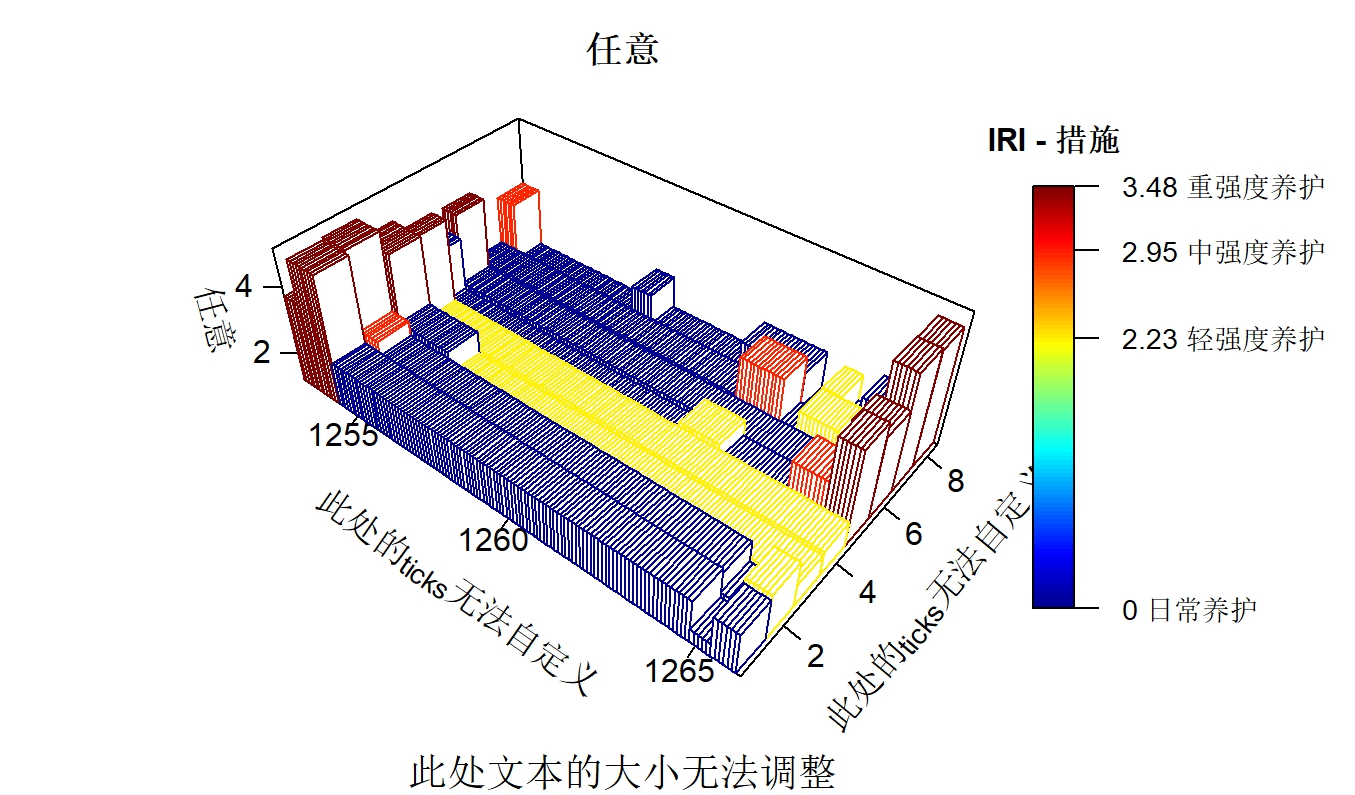
有没有常用plot3D的大神帮忙看下,plot3D画的图,坐标轴的刻度及对应文本无法自定义设置。如果是常规作图,很简单,令xaxt或yaxt="n",然后加入一行代码axis(1,at=c(1,2,3),labels=c("s","a","d"))即可,可惜这些命令及参数对plot3D无效,可能是plot3D包没有加入对这些功能的支持。plot3D有个参数axes,令其为FALSE,则能同时实现xaxt=yaxt=zaxt="n"的效果,但无法单独设置某个轴。令轴消失不是关键,关键是后续自定义轴刻度及标签,但是plot3D似乎未提供相应的功能。另一方面,sub(副标题)这个参数是支持的,但是cex.sub这个参数不支持,副标题文字的大小无法调整。。。
综上所述,我想知道:1)plot3D的xyz轴ticks及label能否自定义?2)有没有类似cex.sub的参数可以调整副标题的大小?

附件所述图的绘制代码如下,我发出来供大家参考。

par(mar=c(2,5,2,5),oma = c(0,0,0,0),mfrow=c(1,1))
plot3D::hist3D(x=x,y=1:(2*max(y)),z=z_ppi,colvar = z_measure,col=jet.col(n=100,alpha = 1)[start:end],facets = FALSE,expand=1,colkey = list(plot=TRUE,cex.clab=0.8,length=0.7,at=iri_threshold,labels=iri_threshold_label,cex.axis=0.7),
               clab = "任意",main="任意",cex.main=0.9,scale=FALSE,phi = 40,ticktype='detail',xlab="\n\n\n此处的ticks无法自定义",ylab="\n\n此处的ticks无法自定义",zlab="\n任意",cex.lab=0.7,cex.axis=0.8,nticks=3,sub=paste("此处文本的大小无法调整","\n\n\n",sep = ""))


附件列表
Rplot.jpeg

原图尺寸 489.71 KB

Rplot.jpeg

二维码

扫码加我 拉你入群

请注明:姓名-公司-职位

以便审核进群资格,未注明则拒绝

全部回复
2024-8-8 08:53:21
在`plot3D`包中,对于坐标轴的刻度和标签自定义以及副标题大小的调整确实不如基础绘图函数那般直接。不过,可以通过一些技巧来实现你的需求:

### 1. 自定义XYZ轴刻度及标签

`plot3D`中的`hist3D`, `scatter3D`, 等函数默认情况下并不支持使用类似于`axis()`那样的自定义方式。但你可以先绘制没有坐标轴的图像,然后用`perspbox`或者自行添加文本的方式来实现自定义。

- **关闭自动轴**:首先确保你的绘图中`axes=FALSE`.
- **手动添加轴**:
  - 使用`segments3d`或`lines3d`来画出刻度线。
  - 利用`text3d`函数在适当位置添加标签。

### 示例代码:

```r
# 绘制无坐标轴的基础图像
plot3D::hist3D(x=x, y=1:2, z=1:2, col="lightblue", axes=FALSE)

# 手动添加x轴刻度与文本(示例)
x.tick.locations <- c(1, 5, 10)
segments3d(x.tick.locations, rep(0.5, length(x.tick.locations)),
           z = rep(0.5, length(x.tick.locations)),
           x.tick.locations, rep(1, length(x.tick.locations)),
           z=rep(1, length(x.tick.locations)), col="black")
text3d(x.tick.locations, 0.5, 0.6, labels=x.tick.locations)

# y和z轴同理,调整参数即可
```

### 2. 调整副标题大小

`plot3D`中的`sub`参数支持添加副标题,但默认不支持通过直接的参数(如`cex.sub`)来改变其大小。但是,你可以使用`mtext()`函数在图边缘添加文本,并利用`cex`参数调整文本大小。

### 示例代码:

```r
par(mar=c(5,4,4,2) + 0.1)
plot3D::hist3D(x=x, y=1:2, z=1:2, col="lightblue")
# 使用mtext()添加副标题,并设置cex来调整大小
mtext(side=3, text="This is a subtitle", cex=1.5) # side=3代表顶部
```

这样,你就可以在`plot3D`中更灵活地控制轴的刻度和标签以及文本的大小了。希望这能帮到你!

此文本由CAIE学术大模型生成,添加下方二维码,优先体验功能试用


二维码

扫码加我 拉你入群

请注明:姓名-公司-职位

以便审核进群资格,未注明则拒绝

2024-8-16 08:44:22
非常感谢,我试试看!
二维码

扫码加我 拉你入群

请注明:姓名-公司-职位

以便审核进群资格,未注明则拒绝

2024-8-21 11:04:56
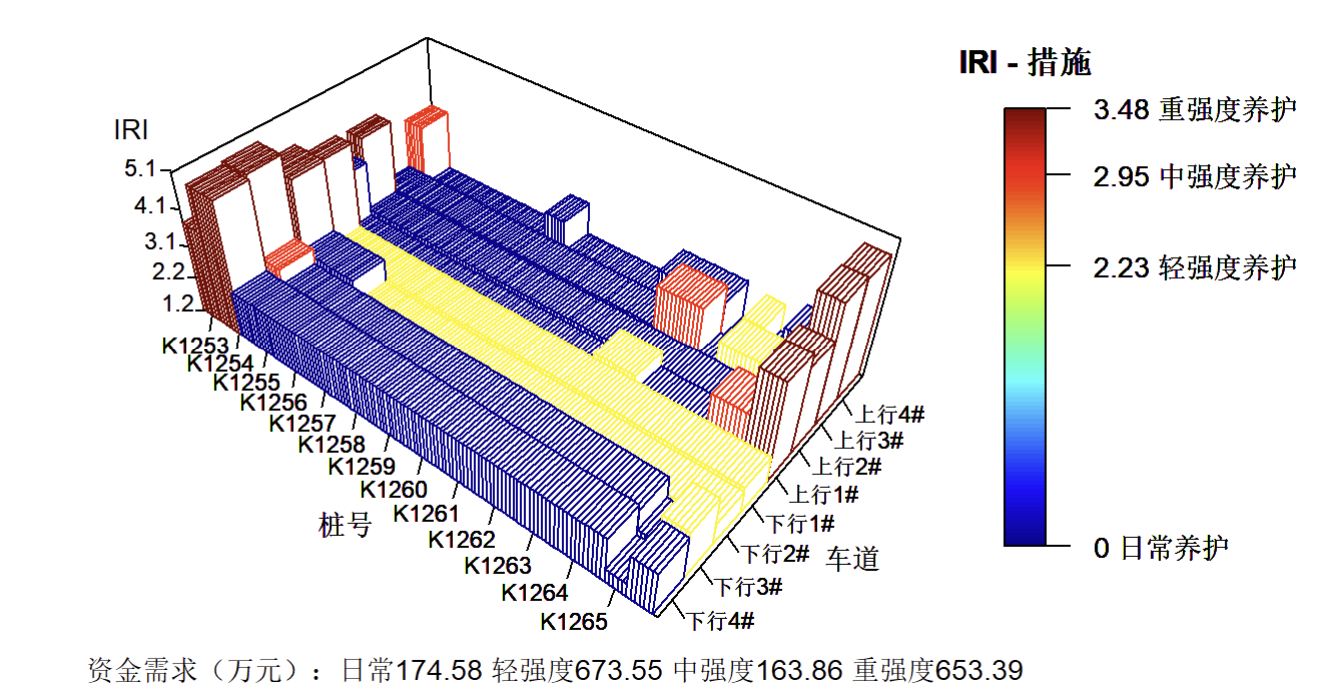
感谢大神,按照您的方法,终于做出来了!您给的代码中有些小错误,但是瑕不掩瑜,以下是完整代码及效果图。
#正式绘图
par(mar=c(2,5,2,5),oma = c(0,0,0,0),mai=c(0.3,0.5,0.4,1),mfrow=c(1,1))# $mai[1] 0.4 1.0 0.4 1.0
plot3D::hist3D(x=x,y=1:(2*max(y)),z=z_ppi,colvar = z_measure,col=jet.col(n=100,alpha = 1)[start:end],facets = FALSE,expand=1,colkey = list(plot=TRUE,cex.clab=0.8,length=0.7,at=iri_threshold,labels=iri_threshold_label,cex.axis=0.7),axes=FALSE,
               clab = "IRI - 措施",main=paste(facility_name,year,"年规划养护方案"),cex.main=0.9,scale=FALSE,phi = 40)
x.tick.locations <- seq(from=x[1],to=x[length(x)-1],by=1)
#x轴ticks
segments3D(x0=x.tick.locations, y0=rep(0.5, length(x.tick.locations)),z0=rep(0.5, length(x.tick.locations)),
           x1=x.tick.locations, y1=rep(0.7, length(x.tick.locations)),z1=rep(1, length(x.tick.locations)), col="black",add = TRUE)
text3D(x.tick.locations-1, rep(-0.3, length(x.tick.locations)), rep(0, length(x.tick.locations)), labels=paste("K",x.tick.locations,sep=""),cex=0.6,add = TRUE)
text3D(mean(x.tick.locations), -1.5, 0, labels="桩号",cex=0.7,add = TRUE)
#y轴ticks
y.tick.locations <- 1:(2*max(y))
segments3D(x0=rep(max(x), length(y.tick.locations))-0.3, y0=y.tick.locations+0.7,z0=rep(0, length(y.tick.locations)),
           x1=rep(max(x), length(y.tick.locations)), y1=y.tick.locations+0.7,z1=rep(-0.3, length(y.tick.locations)), col="black",add = TRUE)
text3D(rep(max(x)+0.1, length(y.tick.locations)),y.tick.locations+0.5,rep(0, length(y.tick.locations)), labels=c("下行4#","下行3#","下行2#","下行1#","上行1#","上行2#","上行3#","上行4#"),cex=0.6,add = TRUE)
text3D(max(x)+1.5, mean(y.tick.locations), 0, labels="车道",cex=0.7,add = TRUE)
#z轴ticks
z.tick.locations <- round(seq(from=min(z_ppi,na.rm = TRUE),to=max(z_ppi,na.rm = TRUE),length.out=5),1)
segments3D(x0=rep(min(x), length(z.tick.locations))+0.5, y0=rep(0, length(z.tick.locations)),z0=z.tick.locations+0.6,
           x1=rep(min(x), length(z.tick.locations))+0.7, y1=rep(0.1, length(z.tick.locations)),z1=z.tick.locations+0.6, col="black",add = TRUE)
text3D(rep(min(x), length(z.tick.locations))-1,rep(0, length(z.tick.locations)),z.tick.locations, labels=z.tick.locations,cex=0.6,add = TRUE)
text3D(min(x)-1, 0, max(z.tick.locations)+1, labels="IRI",cex=0.7,add = TRUE)
#副标题
mtext(side=1, text=tmp2, cex=0.7)
附件列表

Screenshot 2024-08-21 110258.png

原图尺寸 399.33 KB

Screenshot 2024-08-21 110258.png

二维码

扫码加我 拉你入群

请注明:姓名-公司-职位

以便审核进群资格,未注明则拒绝

相关推荐
栏目导航
热门文章
推荐文章

说点什么

分享

扫码加好友,拉您进群
各岗位、行业、专业交流群