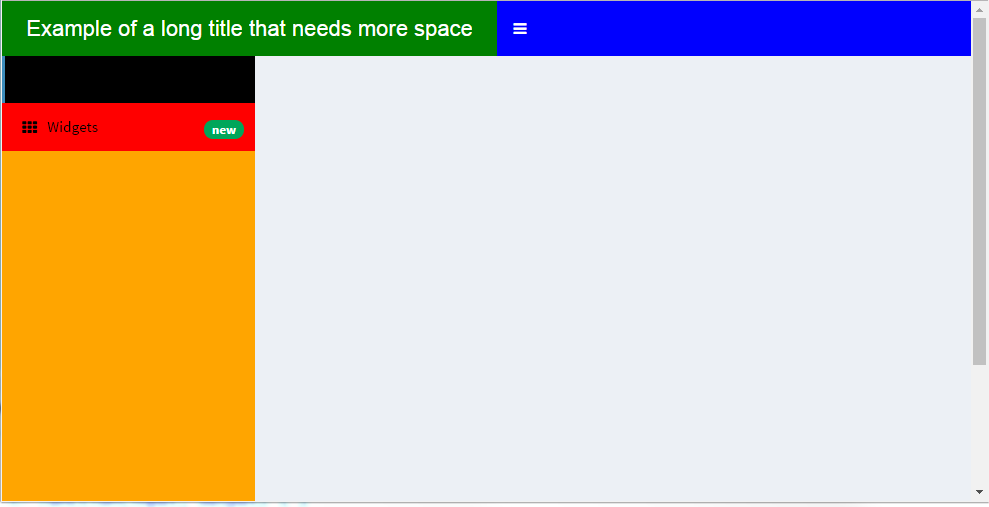
下列代码是一个如何修改shiny dashboard中各个板块颜色完整的列子:
效果图:

library(shiny)
library(shinydashboard)
ui <- dashboardPage(
dashboardHeader(
title = "Example of a long title that needs more space",
titleWidth = 450
),
dashboardSidebar( sidebarMenu(
menuItem("Dashboard", tabName = "dashboard", icon = icon("dashboard")),
menuItem("Widgets", icon = icon("th"), tabName = "widgets",
badgeLabel = "new", badgeColor = "green")
)),
dashboardBody(
# Also add some custom CSS to make the title background area the same
# color as the rest of the header.
tags$head(tags$style(HTML('
/* logo 颜色 */
.skin-blue .main-header .logo {
background-color: green;
}
/* 鼠标点击logo时呈现的颜色 */
.skin-blue .main-header .logo:hover {
background-color: red;
}
/* logo同一行剩下的颜色 */
.skin-blue .main-header .navbar {
background-color: blue;
}
/* 左边列表主要颜色 */
.skin-blue .main-sidebar {
background-color: orange;
}
/* 左边列第一个按钮颜色 */
.skin-blue .main-sidebar .sidebar .sidebar-menu .active a{
background-color: black;
}
/* 左边列第二个按钮颜色已经上面的字体图标等颜色*/
.skin-blue .main-sidebar .sidebar .sidebar-menu a{
background-color: red;
color: black;
}
/* other links in the sidebarmenu when hovered */
.skin-blue .main-sidebar .sidebar .sidebar-menu a:hover{
background-color: #ff69b4;
}
/* toggle button when hovered */
.skin-blue .main-header .navbar .sidebar-toggle:hover{
background-color: #ff69b4;
}
')))
)
)
server <- function(input, output) { }
shinyApp(ui, server)




 扫码加好友,拉您进群
 全部版块
全部版块 我的主页
我的主页


 收藏
收藏