具体代码:
install.packages("gcookbook")
install.packages("ggplot2")
library(gcookbook)
library(ggplot2)
csub<-subset(climate,Source=="Berkeley"&Year>=1900) #记住,这个Source的S一定要大写,因为它来源于gcookbook包的 climate中的数据
csub$pos<-csub$Anomaly10y>=0 #变量pos对取值正负情况进行标识
csub
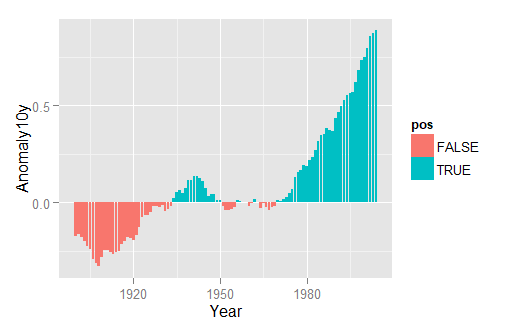
ggplot(csub,aes(x=Year,y=Anomaly10y,fill=pos))+geom_bar(stat = "identity",position="identity")
#pos映射给填充色参数fill
#ggplot2一般是使用“+”号,接后面的代码
#geom_bar绘制条形图
#position="identity"可避免系统对负值绘制堆积条形而发出警告信息
#但是这样画出来的图红色对应负值,蓝色对应正值
#下面代码对颜色进行调整
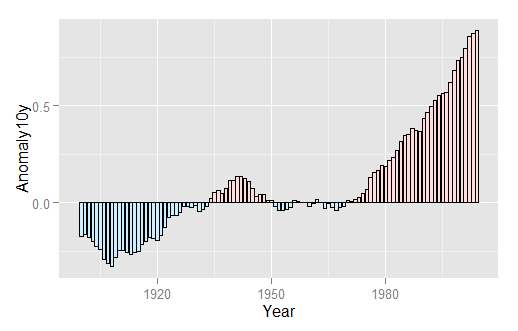
ggplot(csub,aes(x=Year,y=Anomaly10y,fill=pos))+geom_bar(stat = "identity",position="identity",
colour="black",size=0.25)+scale_fill_manual(values = c("#CCEEFF","#FFDDDD"),
guide=FALSE)
#scale_fill_manual()参数对图形颜色进行调整
#guide=FALSE可以删除图例
#colour设定边框颜色(这里为图形加一个黑色的边框)
#size是设定边框线宽度的参数,单位是毫米
Global climate temperature anomaly data from 1800 to 2011
Description
[size=13.3333px]This data set includes estimated global temperature anamoly data for the years 1800 through 2011. The anomaly is the difference from the baseline temperature, which is the mean of the yearly temperatures from 1951-1980.
Variables- Source: Data source (Berkeley, CRUTEM3, NASA).
- Year: Year for the estimate.
- Anomaly1y: Temperature anomaly in Celcius, smoothed over one year.
- Anomaly5y: Temperature anomaly in Celcius, smoothed over five years.
- Anomaly10y: Temperature anomaly in Celcius, smoothed over ten years.
- Unc10y: Uncertainty for 10-year-smoothed anomaly.
Source[size=13.3333px]Berkeley Earth Project: http://berkeleyearth.org/dataset/
[size=13.3333px]Climatic Research Unit (CRUTEM3):http://www.cru.uea.ac.uk/cru/data/temperature/
[size=13.3333px]NASA: http://data.giss.nasa.gov/gistemp/
[size=13.3333px][Package gcookbook version 1.0 Index]
![KEYD]JB6U28TG0QGP9SNKI3.png](https://m.pinggu.org/bbs/forum.php?mod=image&aid=2921506&size=200x200&key=790514580a1697f2&type=fixnone "KEYD]JB6U28TG0QGP9SNKI3.png")
上表是csub显示出的数据集

下面对画出来的距平图进行修改

可以看到经过修改后,作为暖色的红色表示距平的正值,而蓝色表示负值。




 扫码加好友,拉您进群
 全部版块
全部版块 我的主页
我的主页

 收藏
收藏
![KEYD]JB6U28TG0QGP9SNKI3.png](https://bbs-pic.datacourse.cn/forum/201909/07/2014407yrftx811su7sccr.png "KEYD]JB6U28TG0QGP9SNKI3.png")