1. Select the table that has the format and formulas you want to copy from
2. Click Ctrl+C
3. Open, then select the table you want copy the format and formula to
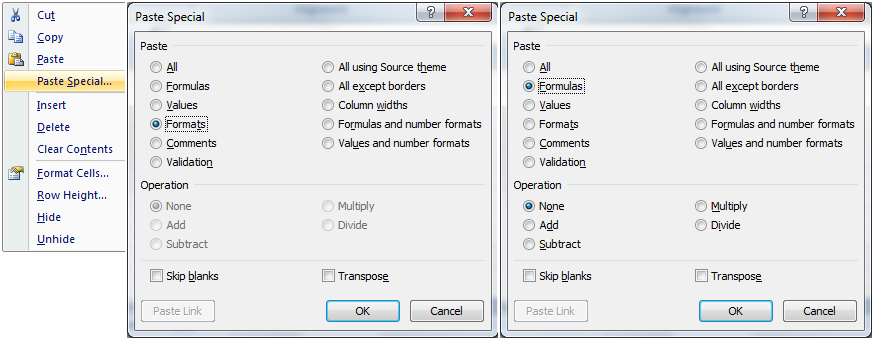
4. Right click, then click Paste Special
5. Select formula, then click OK
6. Repeat 3 and 4
7. Select format, then click OK
1. Select the table that has the format and formulas you want to copy from
2. Click Ctrl+C
3. Open, then select the table you want copy the format and formula to
4. Right click, then click Paste Special
5. Select formula, then click OK
6. Repeat 3 and 4
7. Select format, then click OK




 扫码加好友,拉您进群
 全部版块
全部版块 我的主页
我的主页

 收藏
收藏



 [victory][victory]





