全部版块 我的主页
论坛 数据科学与人工智能 数据分析与数据科学 SPSS论坛
9508 4
2016-11-18
    各位老师同学大家好,我最近在用process做调节分析,首先我直接分层回归,直接得出结果哪些维度之间有交互,之后使用process插件又分析了一遍,我主要想请问大家process可以做出简单斜率图吗?怎样用Process看出自变量对因变量的影响在调节变量的不同水平下是否具有差异呢?
二维码

扫码加我 拉你入群

请注明:姓名-公司-职位

以便审核进群资格,未注明则拒绝

全部回复
2016-11-19 21:28:46
同问 等待大侠回复
二维码

扫码加我 拉你入群

请注明:姓名-公司-职位

以便审核进群资格,未注明则拒绝

2016-11-21 10:19:56
下面的数据结果是我用J-N法做出来的,可是不知道怎么看J-N那部分,结果怎么解释,有知道的吗?Run MATRIX procedure:

************* PROCESS Procedure for SPSS Release 2.16.1 ******************

          Written by Andrew F. Hayes, Ph.D.       www.afhayes.com
    Documentation available in Hayes (2013). www.guilford.com/p/hayes3

**************************************************************************
Model = 1
    Y = cy1
    X = cx1
    M = cx6

Sample size
        678

**************************************************************************
Outcome: cy1

Model Summary
          R       R-sq        MSE          F        df1        df2          p
      .1579      .0249    28.3188     5.7438     3.0000   674.0000      .0007

Model
              coeff         se          t          p       LLCI       ULCI
constant      .1039      .2069      .5024      .6155     -.3022      .5101
cx6          -.0333      .1143     -.2911      .7710     -.2576      .1911
cx1           .0971      .0444     2.1857      .0292      .0099      .1843
int_1         .0793      .0244     3.2474      .0012      .0313      .1272

Product terms key:

int_1    cx1         X     cx6

R-square increase due to interaction(s):
         R2-chng          F        df1        df2          p
int_1      .0153    10.5455     1.0000   674.0000      .0012

*************************************************************************

Conditional effect of X on Y at values of the moderator(s):
        cx6     Effect         se          t          p       LLCI       ULCI
    -1.8120     -.0466      .0655     -.7103      .4778     -.1753      .0821
      .0000      .0971      .0444     2.1856      .0292      .0099      .1843
     1.8119      .2407      .0597     4.0331      .0001      .1235      .3579

Values for quantitative moderators are the mean and plus/minus one SD from mean.
Values for dichotomous moderators are the two values of the moderator.

********************* JOHNSON-NEYMAN TECHNIQUE **************************

Moderator value(s) defining Johnson-Neyman significance region(s)
      Value    % below    % above
    -3.9410     1.4749    98.5251
     -.1158    61.6519    38.3481

Conditional effect of X on Y at values of the moderator (M)
        cx6     Effect         se          t          p       LLCI       ULCI
    -6.1409     -.3897      .1603    -2.4315      .0153     -.7044     -.0750
    -5.5409     -.3422      .1463    -2.3394      .0196     -.6293     -.0550
    -4.9409     -.2946      .1324    -2.2255      .0264     -.5545     -.0347
    -4.3409     -.2470      .1187    -2.0817      .0377     -.4800     -.0140
    -3.9410     -.2153      .1097    -1.9635      .0500     -.4307      .0000
    -3.7409     -.1995      .1052    -1.8958      .0584     -.4061      .0071
    -3.1409     -.1519      .0921    -1.6488      .0997     -.3328      .0290
    -2.5409     -.1043      .0796    -1.3109      .1903     -.2606      .0519
    -1.9409     -.0568      .0679     -.8361      .4034     -.1901      .0766
    -1.3409     -.0092      .0576     -.1599      .8730     -.1223      .1039
     -.7409      .0384      .0495      .7748      .4387     -.0588      .1355
     -.1409      .0859      .0449     1.9147      .0560     -.0022      .1740
     -.1158      .0879      .0448     1.9635      .0500      .0000      .1758
      .4591      .1335      .0448     2.9805      .0030      .0455      .2214
     1.0591      .1810      .0493     3.6750      .0003      .0843      .2778
     1.6591      .2286      .0572     3.9933      .0001      .1162      .3410
     2.2591      .2762      .0675     4.0912      .0000      .1436      .4087
     2.8591      .3237      .0792     4.0900      .0000      .1683      .4792
     3.4591      .3713      .0917     4.0506      .0001      .1913      .5513
     4.0591      .4189      .1047     3.9993      .0001      .2132      .6245
     4.6591      .4664      .1182     3.9470      .0001      .2344      .6985
     5.2591      .5140      .1319     3.8977      .0001      .2551      .7729
     5.8591      .5616      .1458     3.8528      .0001      .2754      .8477

******************** ANALYSIS NOTES AND WARNINGS *************************

Level of confidence for all confidence intervals in output:
    95.00

------ END MATRIX -----
二维码

扫码加我 拉你入群

请注明:姓名-公司-职位

以便审核进群资格,未注明则拒绝

2016-11-21 10:21:59
jin216 发表于 2016-11-19 21:28
同问 等待大侠回复
I这是别人给的答案,然而依然不知道怎么做n the Process output, search for the heading titled "Johnson-Neyman Technique: Conditional effect of X on Y at values of the moderator (M)", you may find a set of data that are divided into seven columns. Copy the data that corresponds to these four columns: ModVar, Effect, LLCI and ULCI. Create a new SPSS dataset, paste the data from the output into the new dataset, setup the variable names, and use the graph builder to plot the data.

二维码

扫码加我 拉你入群

请注明:姓名-公司-职位

以便审核进群资格,未注明则拒绝

2018-8-29 20:17:59
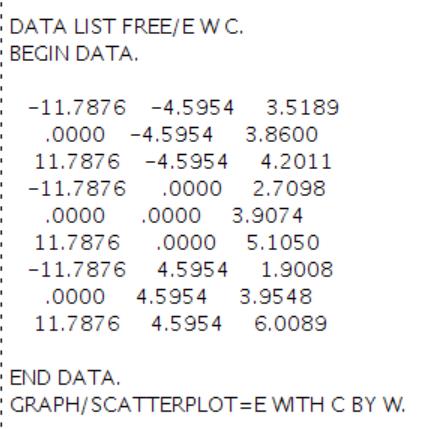
您好,浏览帖子学习时刚好看到这个疑问,不知道您现在解决了没?那段话的意思是你可以在调节效应检验的结果中找到如图片中(那是我自己的数据)所示的这些内容,然后复制到语句编辑器里面运行就可以出来你想要的调节效应图。

附件列表
二维码

扫码加我 拉你入群

请注明:姓名-公司-职位

以便审核进群资格,未注明则拒绝

相关推荐
栏目导航
热门文章
推荐文章

说点什么

分享

扫码加好友,拉您进群
各岗位、行业、专业交流群